1.) Restart your computer.
2.) If remote or off our network, connect to the VPN and then proceed to step 3. If onsite, proceed to step 3.
3.) Click the Windows icon in the bottom-left corner of then screen and then type “This PC”. Click on “This PC” to open it.
4.) Click on the Computer Tab and then click on “Map Network drive”.
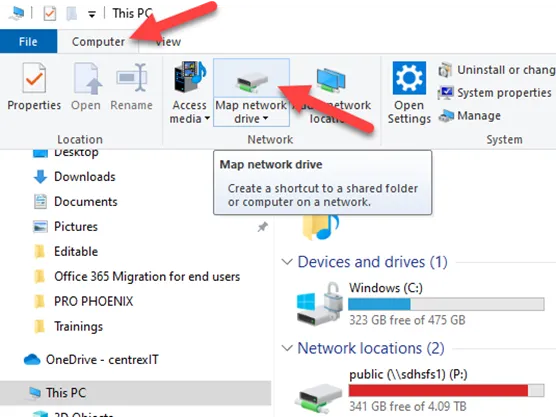
5.) In the window that opens, select H: from the Drive drop-down menu.
6.) In the Folder section copy the following, depending on what drive you need access to, and paste it into the box:
Learning and Development: \\sdhsfs1\Learning_and_Development
Phomms Data: \\sdhsfs1\PhommsData$
PAWS: \\sdhsfs1\paws
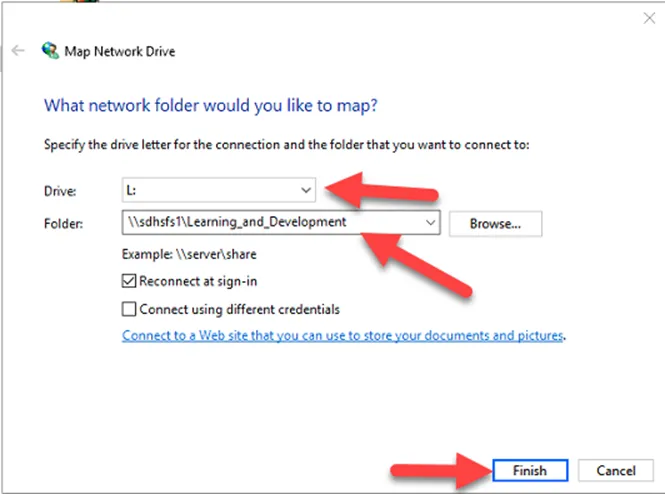
7.) Click on Finish. This will open the folder in a new window. You can now see it next to the other network drives.
You have now added a new network drive. Please contact IT if you run into any problems.
IT contact info:
Email: sr@sdhumane.org
Website: help8787.com -> service request