1. Disable the account in Active Directory.
2. Move the account to the Terminated Users OU.
3. Remove account from all groups; these will be in the Member Of tab.
4. Block sign-in in Admin 365.
5. Toggle global address visibility to OFF
https://medium.com/gitbit/hide-user-from-address-lists-ad-connect-ee67f2369bc1
**If this does not work please change the AD attribute.
6. Sign this user out of all Office 365 sessions.
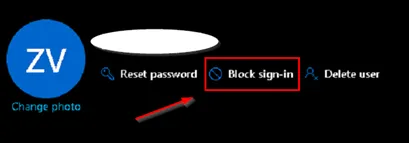
7. Remove the Microsoft 365 E3 and Microsoft Defender for Office 365 (Plan 2) licenses in Admin 365.

Employee hardware will be returned to the user’s supervisor, who will then return it to the IT techs.
Please use the following template when replying to the offboarding request ticket:
Hello {POC},
Thank you for your time today. Per your request, the requested account has been terminated.
I will now update the status of this Request {Ticket Number} to Closed.
Please feel free to reply to this message or give us a call if you need any further assistance.
Thank you,
Your centrexIT Service Desk team
619.651.8787 | centrexIT.com