Purpose:
Section titled “Purpose:”To provide instructions on how to perform a review of a completed assessment within vCIO Toolbox.
Scope:
Section titled “Scope:”This work instruction applies to centrexIT virtual Chief Information Officer (vCIO), who are responsible for reviewing completed assessments to then generate strategic initiatives that drive clients IT Strategy forward.
Responsibility:
Section titled “Responsibility:”vCIO and vITM
Completion Criteria:
Section titled “Completion Criteria:”A reviewed assessment and acceptance of that assessment.
Records:
Section titled “Records:”An assessment located in the client space within vCIO Toolbox.
Steps:
Section titled “Steps:”Reviewing a completed assessment
- Identify the assessment to review within vCIO Toolbox, typically it would be a client with a scheduled QBR (Quarterly Business Review) meeting within the next 2 to 3 weeks.
- It is crucial assessment review happen 2-3 weeks in advanced to submit Project Requests within a reasonable time frame, to have either a quote or budgetary numbers by the time vCIO meets with client.
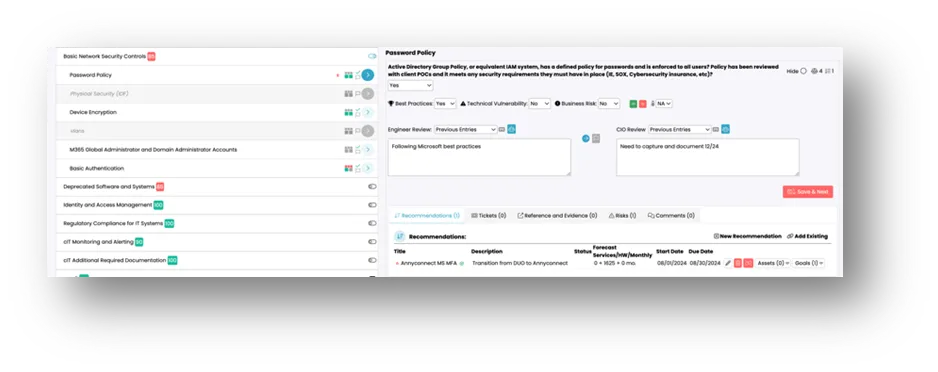
- Within the IT Review, confirm all questions have been answered and have an acceptable note that indicates the answer to the question has been verified.
-
a. The “NO” answer does not automatically trigger a negative score for the report. The Best practices, technical vulnerability, and business risk boxes set the actual score for that question.
-
b. For Best Practices, this should only be a “YES” answer if the client meets the centrexIT recommended standards for all instances of where this question would apply and everything listed is documented fully, under warranty and support, and fully supportable by centrexIT. c. For Technical Vulnerability, this should only be set to “yes” if a client has recent tickets or outages associated with the items, if there are known issues, the device is out of support and/or warranty, or if there is a believed imminent risk of failure for any reason. Use the business risk if the item is not technically deficient by there is risk associated with the device or configuration. d. For Business Risk, this should be answered yes, if there is business (financial, security, etc) risk associated with this item. This could be a yes, even if there is no immediate technical vulnerability and it meets the best practices requirements, if it still presents a risk to the environment for another reason.
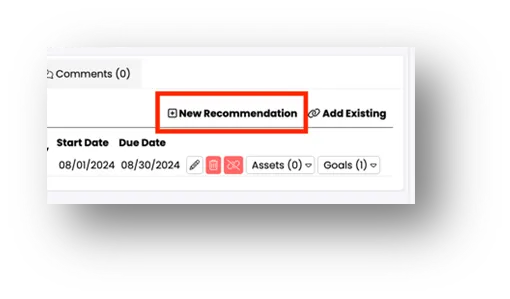
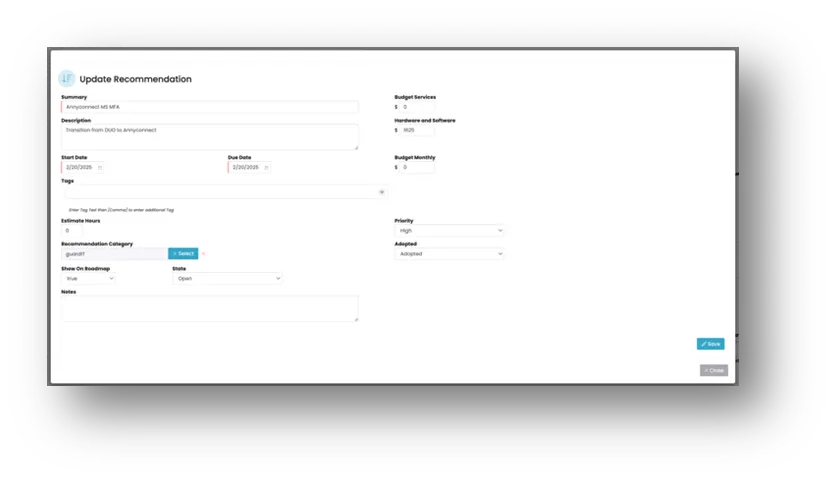
- As questions answered are reviewed, create a recommendation for questions that require remediation.
- Note: Budgetray information may not be available during the review and will need to be added after receiving the budget numbers or the quote from Design Desk.
- As recommendations are added, the roadmap section of vCIO Toolbox will start to reflect the recommendations that have been created.
- Review the recommendations produced from the assessment, identify high risks recommendations that will need to be a priority during the Quarterly Business Review.
Process References:
Section titled “Process References:”- Create a relationship back to related process. Note: Please add KB relationships to core process, process, SOPs or other WIs on the right.