PROCEDURE
The following is a high-level view of the permissions structure in the Halo platform
REQUIREMENTS
There are no requirements.
STEPS
No steps - general info only.
BASIC PERMISSIONS STRUCTURE:
Section titled “BASIC PERMISSIONS STRUCTURE:”A function is the actual permission or security placed within a particular Group.
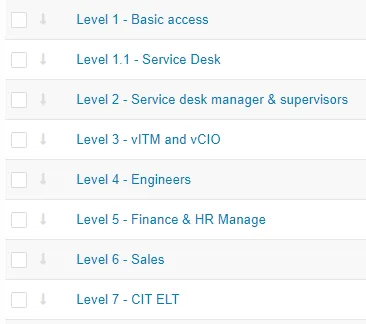
Level 1 - Basic - this is given to all Users in the centrexIT employee and centrexIT contractors groups. It allows for basic viewing with limited data creation throughout the platform.
Level 1.1 - Service Desk - this is given to any member of the various Service Desk teams and functions and includes the permissions needed to support ticket management. (It includes Level 1)
Level 2 - Service desk managers and supervisors - is given the Service desk management team along with Level 1.1 and provides them access to additional slots needed to support the department.
Level 3 - vITM and vCIO - this is given to the vITMs and vCIOs and includes access to more confidential client information such as agreement management
Level 4 - Engineers - this is given to several groups: Projects, Cloud, NOC, CSOC and provides access to buckets and slots that are needed to support change management, projects and task such as onboarding and offboarding clients
Level 5 - Finance & HR management - is given to Finance and HR to aid with employee data, rates, and profitability reporting (this group does not have access to levels above that are primarily grouped To ticket management or account management)
Level - Sales - this is given to the Sales and Marketing teams and focuses on agreement creation and management, profitability, and revenue generation
Level 7 - CIT ELT - this is given to the executive team to make them feel as though they have their own group of functions that just provides a view into the platform.
An employee can contact any Admin to ask about the users permission.