The Who and Where of a Ticket
Please refer to Figure 1 - 3. as a reference for bullet points
1. Ticket Type. Is it an incident, a request, alert, or a problem?
a. Each one of those ticket types creates a different workflow and SLA requirement. Please use the following guide when choosing ticket type:
i. Incident – something WAS working and now it is not.
ii. Request – Something that is fundamentally new.
iii. Alert – issue is a break in monitoring threshold.
iv. Problem – multiple or recurring issue that needs a CAPA
CAPA = Corrective action, or root cause analysis, and preventive action to keep the issue from recurring.
2. Ticket Summary. This needs to reflect the core reported issue. Summaries are used for reporting, KB search, and management of ticket flow. It needs to be accurate and updated.
3. Callback Number. Make sure you get an accurate callback number. The user may want to be called back on their cell if they are working from home, or they could be in their office and using a direct dial number. We need to verify the best way to contact the user.
4. Location. The location is WHERE the service needs to be delivered. People who are scheduling may or may not know that an office is in another city or if someone is traveling or working from home.
5. Requested By. This is the person who requested service. It might be an HR person, or a client point of contact. It is not always the person who needs service, but the person who needs to sign off that the ticket is complete.
6. Requested For. This is the person who needs service. We need full names and contact information.
Ticket Categorization
The What and When of a Ticket
7. Priority. Priority is set by the SLA (Service Level Agreement) based on impact and urgency of a ticket. centrexIT uses Priority to create an XLA (Experience Level Agreement) by understanding the business and the affect of the issue on the people and the business we support.
a. Companies tagged as At-Risk get a 1 level increase in priority, up to P2 for non-critical issues.
b. Users tagged as VIP get a 1 level increase in priority, up to P2 for non-critical issues.
c. Companies tagged as Onboarding get moved to the Onboarding Engineer or vITM for support issues.
8. Parent. If an issue has already been reported and there is an existing ticket, then we would follow the “How to Child a Ticket” process and it would be reflected here.
Additional Details
9. Input Source. How did the ticket get reported? This helps guide resource decisions (phone calls vs. email) and to see how the clients interact with us. The more portal tickets mean the users can self-service more, putting less of a demand on the team.
Category and Subcategory are critical fields. These fields are used to provide business intelligence to the vITM and vCIO so they can see WHAT and WHERE noise is occurring in the client environment. These fields are also used to set up consumption against client agreements. WHAT we are doing and WHERE we are doing it and WHEN it is occurring can trigger additional billing to the client and must be accurate.
10. Category. This is the high-level reporting category of an issue.
11. Subcategory. This is the actual issue reported or type of service being delivered.
12. Assignment Group. Which team is responsible for this ticket moving forward?
13. Assignment User. The person who is the owner of a ticket.
a. You cannot assign a user without their acceptance for same day service.
The body of the ticket
The ticket body has two parts. Please be aware of which ticket body you are putting information into as it can be client visible.
14. Public Conversation. This is the client facing portion of a ticket. When clients or associated vendors email regarding a ticket, the dialogue is captured here, oldest to newest. This is also where we communicate with the client via ticket updates.
15. Internal Activity. This area is used to track internal initiatives related to ticket fulfillment. This information should be inclusive of troubleshooting steps to allow another person to understand the effort and quality of service. Internal is not seen by the client, it should be very detailed and technical, but still needs to remain accurate, complete, and professional to help with back office tasks.
Service Level Agreement and Client Acceptance
SLA and Resolution Codes
SLA and Resolution codes are key to being able to show value to our clients in our ability to deliver quality service in an agreed upon manner. Clients outsource IT to our team to be able to take advantage of having a large-scale support system without the extensive overhead and management of internal IT. We must work within the SLA boundaries to create the quality experience level (XLA) that reflects the core of centrexIT CLASS.
16. Time to Respond. The target is Live Answer or under 15 minutes. It reflects how fast we:
a. Answer a call.
b. Convert an intake ticket into “In Progress” Status
17. Time to Resolution. The target is based on the Impact and Urgency of a ticket. The average time per ticket should be 30 minutes.
18. Resolution Code. These are pre-defined codes used to improve the knowledge base and reporting for the client and increase the efficiency of the team.
19. Internal Notes. This is the actions that were required to fix the root of the ticket.
20. Resolution Notes to Requestor. This is the email to the customer where we acknowledge the ticket and have completed the ticket to the client’s satisfaction.
Impact and Urgency
21. Impact. Impact is measure of the extent of the Incident and of the potential damage caused by the Incident before it can be resolved.
22. Urgency. Urgency is a measure how quickly a resolution of the Incident is required.
Relationships
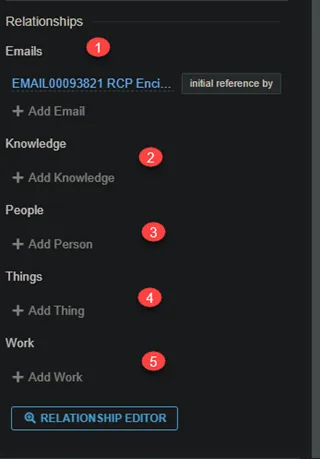
Perhaps one of the most powerful features within Halo is the ability to easily create relationship to various related items. This sets the ticket, the team, and the client up for the highest chance of success and a positive service experience.
Setting up for success
23. Emails. These are all the actual emails related to the ticket. At times, it is easier to review the actual email versus the converted version in the Public Conversation.
24. Knowledge. The knowledge area can be used to link KB Article or Work Instructions to help support the ticket and the team throughout the lifecycle.
25. People. This is a list of anyone associated with a ticket and the role they play. The people relationship is:
a. Vendor. Vendor that is assisting in work.
b. Watching. Users who are watching a work record, such as vITM or client POC.
c. Assisting. Assisting in a work record, such as team members for escalations.
d. Lead. Lead person on a piece of work. This is the accountable person on the cIT side of service.
26. Things. Things are configuration items related to the piece of work. This can be a user’s workstation, a firewall or access point, or even a piece of software.
27. Work. This can be other tickets that are related to this one. Work types are:
a. Parent Work. Parent to child work relationship
b. Child Work. Child to Parent work relationship
c. Problem. Incidents that are related to a problem. The parent problem record is normally the root cause of the incident
d. Rollup Form. An alert’s data can roll up to an incident
e. Change. Incidents that are related to a change. The parent change record is normally the solution of the incident
Figure 1.
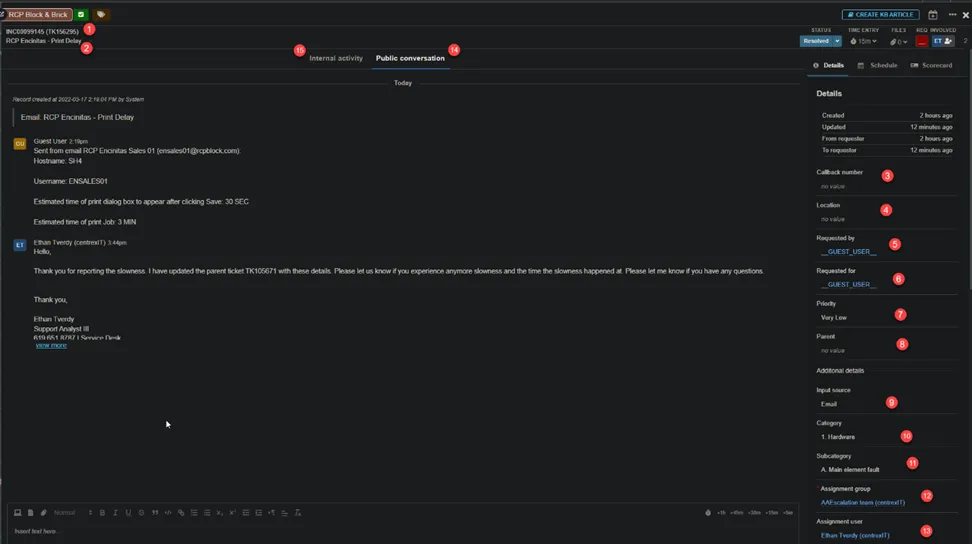
Figure 2.
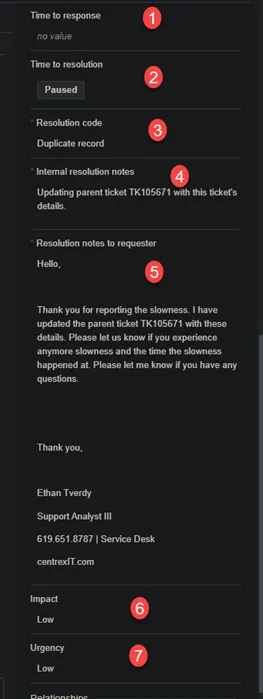
Figure 3.